Tampilkan postingan dengan label Theme Pc. Tampilkan semua postingan


Windows 8 Skin Pack 2.0


http://img143.imageshack.us/img143/2118/510342women.jpg


Ini adalah paket yang bagus transformasi untuk mengubah Windows 7 Windows 8, Anda bahkan tidak bisa membedakan setelah transformasi dari aslinya. Instalasi sederhana dan memungkinkan Anda untuk memilih item yang ingin memodifikasi, mengubah sepenuhnya desain seluruh OS anda, dari label untuk dekorasi jendela dan suara baru

HANYA UNTUK WINDOWS 7!!!


»»  READMORE...


Win2-7 Pack


=== Intro: ===
Even from its start in late 2009 as an Gnome Icon pack, the Win2-7 Packs goal has not changed...To be the most comprehensive, easily installable, customizable and most user friendly Windows 7 Transformation Pack on earth for the Gnome Desktop! :D We are amazed at how close we have come! Feel free to download and install it, make sure to vote if you like it and comment if you have anything to say and even donate a few bucks! But be sure to read the FAQ first before you install. We have put in hours and hours to make the Win2-7 pack do a very careful and safe installation and uninstallation, but none the less, use at your own risk and make a backup just as you would during any major update. Anyone involved in the Win2-7 Pack Team is not liable for any dataloss or damage that is the direct or indirect result of the Win2-7 Pack.


=== Quick FAQ: ===
Q: How do I install? A: Run GUIInstall.sh.
Q: How do I uninstall? A: Run GUIUninstall.sh.
Q: What languages are there? A: English, Spanish, Croatian, Portuguese and French.
Q: Is it compatible with my system? A: Check the "Compatibility Chart" under Links.
Q: How can I extract it? A. Use "Extract Here" from the context menu or run "cat Win2-7Pack*.tar.lzma | lzma -d | tar x" at a terminal.
Q: When extracting I get: "This does not look like a tar archive"? A: Remove ".tar" from the end of the filename.
Q: I want to help translate? A: Send Dart00 a Private Message with your language and personal e-mail and experience.
Q: My Panel Menu does not look like the one in the Screenshot? A: Gnomenu must be installed (using Win2-7 Essentials or some other way) and added to the panel manually.

Q: My GDM Wallpaper did not change? A: Follow these steps to manually change it (Ubuntu):
Step 1: Open a terminal
Step 2: Run: "sudo add-apt-repository ppa:gdm2setup/gdm2setup" (Without Quotes)
Step 3: Run: "sudo apt-get update" (Without Quotes)
Step 4: Run: "sudo apt-get install python-gdm2setup" (Without Quotes)
Step 5: Run: "sudo gdm2setup"
Step 6: Click "Wallpaper" Tab
Step 7: Click "Select new image"
Step 8: Browse to "/usr/share/backgrounds"
Step 9: Select "Win2-7.jpg"
Step 8: Click "Ok"
Step 9: Click "Close"
Step 10: Close the terminal
Note: You may do this for any wallpaper you want! :D


Download Here
»»  READMORE...

RaveH20 4 Icon Theme (Gnome/XFCE GTK)


The RaveH20 4 Icon Theme Codename:"Danger Days" has been in development for over 9 mouths (Since Version 3). And sees a major overhaul and cleanup in practically all areas of the Icon Theme.

The RaveH20 4 Theme Aims to be an Original (As in Originality and Uniqueness) Shiny and beautiful Theme.
RaveH20 4 doesn't try to mimic,copy or by any means ripoff other Themes or Operating System GUIs. It only tries to be a unique beautiful first class version of it's self. Its also aims to a 100% Free and Legal Icon Theme For Linux,BSD and any other OpenSource desktops, useing GTK, Gnome , XFCE , LXDE or other desktops, It does its best to not use Icons Taken from unauthorized sources, RaveH20 4 Only trys to include Icons Licensed Under the GPL/LGPL (v.2) Created by Us or others! 

You "should" be safe in distributing or modifying RaveH20 4 for your own needs. So you should be able to feel free to use RaveH20 4 in your own distribution, Community,Commercial or Personal Etc but...
(!)NOTE: We cannot make any guarantees or warranty of the RaveH20 4 Icon Theme haveing no non-free content. The aim of the project is for it to have no non-free icons but we cannot make any for sure guarantees as this would make us legally responsible for something we do for free! 


The RaveH20 4 Icon Theme Codename:"Danger Days" has been in development for over 9 mouths (Since Version 3). And sees a major overhaul and cleanup in practically all areas of the Icon Theme.

The RaveH20 4 Theme Aims to be an Original (As in Originality and Uniqueness) Shiny and beautiful Theme.
RaveH20 4 doesn't try to mimic,copy or by any means ripoff other Themes or Operating System GUIs. It only tries to be a unique beautiful first class version of it's self. Its also aims to a 100% Free and Legal Icon Theme For Linux,BSD and any other OpenSource desktops, useing GTK, Gnome , XFCE , LXDE or other desktops, It does its best to not use Icons Taken from unauthorized sources, RaveH20 4 Only trys to include Icons Licensed Under the GPL/LGPL (v.2) Created by Us or others!

You "should" be safe in distributing or modifying RaveH20 4 for your own needs. So you should be able to feel free to use RaveH20 4 in your own distribution, Community,Commercial or Personal Etc but...
(!)NOTE: We cannot make any guarantees or warranty of the RaveH20 4 Icon Theme haveing no non-free content. The aim of the project is for it to have no non-free icons but we cannot make any for sure guarantees as this would make us legally responsible for something we do for free! 


Download (RaveH20 Icons Night Edition (4 Dark Color Panel)
Download (RaveH20 Icons Lights Edition (4 Light Color Panel)
»»  READMORE...

Wii-Black 0.5


Description:
An attempt to port the "Wii - Black" WindowBlinds theme made by tienano at deviantART: http://www.deviantart.com/deviation/38686803/

Lots of kudos to that guy! :)

It's not supposed to be a direct clone, but rather an adaption of it for GTK2.

I am no longer working on this theme. There will be no more updates.

Enjoy! :)
Download
»»  READMORE...

G-Band-metacity


Description:
Garage Band Metacity window borders.

Changelog:
Credits go to Apple's designers who created this; I only put the images together, and if someone tell me that is a copyright violation I'll remove this immediately. Until then, enjoy :)

License: Artistic 2.0

Download
»»  READMORE...

Google-Gnome Metacity

Description:
Metacity-theme for the Google Gnome theme.
An adapted version of \'Googol\" from Dazzl

License: QPL


Download Metacity
Download Gtk2
»»  READMORE...

DustTheme


Description:
Dust is a concept for a new, refreshing look for Ubuntu. The idea was to take the defining aesthetic elements of Ubuntu and remix it into something clean, modern, functional, and unique.

It's a new take on the Ubuntu aesthetic using a dark palette and subtle colors.

License: Creative Commons by
Download
»»  READMORE...

Humanoid - OSX - Dark


Description:
This is a modified version of Humanoids' OSX theme. I just changed the colors and buttons.

License: GPL
Download
»»  READMORE...

Aero 1.1.5


Description:
"I may have hurried its release a little bit, but here it is my version of Vista's Aero theme. Send me some feedback as I am sure there are some needed improvements."

^--That is what it started out as at least now, I do not know what it has evolved into...

Download
»»  READMORE...

Arbeit Macbuntu


Arbeit Macbuntu Theme 1.1.1


!! Fix for 10.04 users: http://dolsilwa.deviantart.com/#/d36uvj6

::General Notes::

-Like in DG09's screenshot, forward/backward button is a fake - it's "up" button restyled to look like forward/backward. But it looks nice ;-)

-Theme is using Pixmap engine, Aurora engine and Murrine engine. It was created on Ubuntu 10.10 so i'm using Murrine for 10.10.

-Theme was designed to use with Nautilus-elementary, i've not tried it with regular nautilus. It looks best with Nautilus-elementary

::Credits::

-In alphabetical order: Bagley, DanRabbit, DG09, Eamon63, Seahorsepip, Timorei. Without their work this theme could not be made.

::Changelog::
New (changed) things are:
- SYNAPTIC LOOKS GOOD!! :-D (finally, it was pain in the a**)
- New handlebox for toolbar
- Scrollbar
- Entries are square now.
- Combobox
- Slider in nautilus
- Toolbar background
- And now theme is compatible with Firefox FOXDIE Theme
::Emerald::

- This theme is compatible with dg09's emerald themes. You can find them here: [link]
::Firefox::
- If you want firefox to look cool download "Foxdie graphite" Add-on and "Hide menubar" Add-on, then apply it both and it will look awesome :-)
::Instalation::

-Unpack ".zip" file. You will get "Arbeit Macbuntu New.tar.gz" file which you can install via your theme manager (in ubuntu just drag and drop it), or you can unpack it and move it to your ".themes" folder (hidden in your user folder)

-You can do the same with icons in "arbeit-macbuntu-icons-new.tar.gz". If you want to manually install it, extract it and copy to your ".icons" folder (hidden in your user folder"

::Nautilus-elementary::

-Forward/back button is really just "up" button. If you want it, right click on toolbar in your nautilus, press "customize toolbar" and remove normal "forward" and "back" buttons and add "up" button.

-This theme has transparent separators so you can arrange your buttons as you like. In my screen it is: "up", 3 separators, view-mode-button, 3 separators, edit location, location pathbar. But of course you can do what you want.

::Ugly Global-menu Arrow::

-If you're using Global-menu-applet you may notice that distributor logo has ugly arrow underneath. To make it invisible there is "hide-globalmenu-triangle.tar.gz" file which you have to extract in your user folder. There are two invisible files ".arrow-blank.png" and ".gtkrc-2.0".


::Panel Backgrounds::

-They are in Panel-backgrounds.tar.gz archive. I think you know what to do :-)

Have fun
Download Here
Download FIx For 10.04
»»  READMORE...

Linkin Park GDM Theme


Linkin Park GDM theme based on Ubuntu Black GDM

***You should have GDM 2.20 or Older to this theme can work

-If not you need to Downgrade your GDM to version 2.20

How to Downgrade GDM in Lucid (Arabic Tutorial ) ==> http://karim.3abber.com/blog.php/653/tadwina/2950

How to Downgrade GDM in Lucid (English Tutorial ) ==> http://ubuntu-virginia.ubuntuforums.org/showthread.php?t=1571304

How to Downgrade GDM in Karmic (English Tutorial ) ==> http://ubuntuforums.org/showthread.php?p=8350408

Download Here
»»  READMORE...

Naruto-Jinchuriki GDM Theme


Nice GDM :), naruto fan should download and try it

Download Here
»»  READMORE...

Ubuntu Theme in Windows 7 – Maverick For Win7


Are you Ubuntu lover ? but you still using Microsoft Windows in workplace or office computer ? just install this theme and you can feel the freedom of ubuntu :).
this theme created by
dpcdpc11 a member of devianart.com

Download the theme in here


and here some tips to install the theme
•Copy the content of Theme folder in “C:\Windows\Resources\Themes\” (Asuming that you’re Windows 7 is installed on partition C)
•To change the Start orb, Use Windows 7 Start Button Changer from the “Tools” folder to change the start orb.Launch Windows 7 Start Button Changer and choose the BMP from the “Resources/Start Orb – Ubuntu” folder and you’re done!
•To remove the blurred edges of the windows, Use Windows 7 Aero Blur Tweaker from the “Tools” folder to remove the windows blur.
»»  READMORE...

Natty Transformation Pack for Windows XP


This is a Transformation Pack for XP that transform Windows XP to Ubuntu 11.04 Natty Narwhal, This pack created by member of deviant art (hameddanger).


Support:
  •  Windows XP (Home, Pro, RTM, SP1, SP2, SP3, Corporate)
  •  Windows 2003 (Standard, Enterprise, Datacenter, Web, RTM, SP1, SP2)
  • Windows Media Center Edition (2003, 2004, 2005)
  •  Windows XP Tablet PC Edition
  •  X86(32Bit) and X64(64Bit) Windows Support
  •  All Language Versions 


Programs : 
  • Resource Hacker
  • Universal Theme Patcher 1.5.0.22 by deepxw
  • Moveex 1.0.1 by Frank P.Westlake
  • JPGtoBMP 1.0 by efg's Computer Labs
  • RocketDock 1.3.5 by punk software
  • Light Ambiance Visual Style by freddi67
Download Here  (14.9 MB)
»»  READMORE...


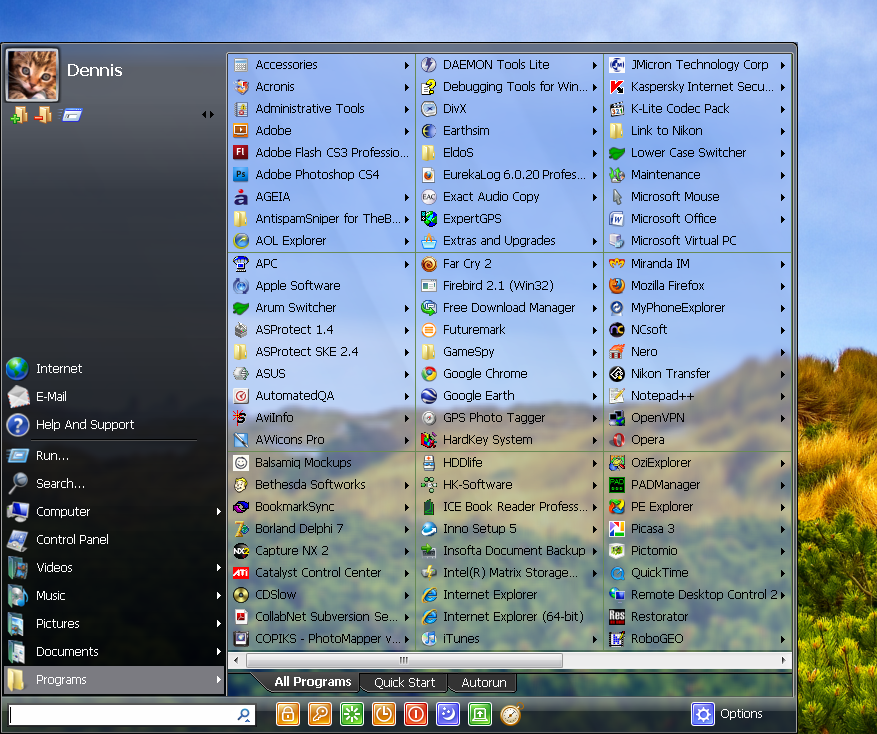
Start Menu 7 + Patch

software yang akan merubah tampilan start menu Windows 7 anda menjadi lebih indah. software ini juga dilengkapi dengan berbagai fitur menarik seperti : Timer, berbagai macam skin (tema), terdapat bahasa indonesia.
jika ada yang kepingin mempercantik tampilan windows 7 anda silahkan download 
Screenshot :


startmenu 7

Download :
»»  READMORE...
Admin
silahkan beri kritikan atau saran kepada kami dengan memberi komentar di posting kami . :)
Diberdayakan oleh Blogger.